반응형
SMALL
GPU 모듈 교체 후에는 GPU 모듈 간 펌웨어 버전이 동일한지 확인하고 맞춰줘야 함
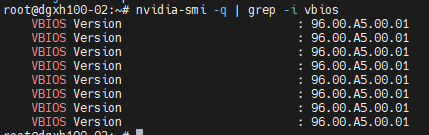
1. 펌웨어 버전 확인
nvidia-smi -q확인 내용:
- VBIOS Version
- GPU 간 펌웨어 버전 차이 여부
교체된 GPU와 기존 GPU의 펌웨어가 다르면 동일한 버전으로 맞춰줘야 함
2. GPU Tray 펌웨어 업데이트
GPU 개별 업데이트가 아니라 GPU Tray 단위로 펌웨어 업데이트 진행
참고:
https://docs.nvidia.com/dgx/dgxh100-fw-update-guide/sequence.html
Firmware Update Steps — NVIDIA DGX H100/H200 Firmware Update Guide
Update the firmware on the network cards. Note During the update, the mlxfwmanager command will report the ConnectX-7 device identified as /dev/mst/mt4129_pciconf0 cannot be updated as shown in the following error message: -E- Failed to query /dev/mst/mt41
docs.nvidia.com
수행 방법
gpu_tray.json다음 내용을 포함하는 파일을 생성 :
{
    "Targets" :["/redfish/v1/UpdateService/FirmwareInventory/HGX_0"]
}
펌웨어를 업데이트 :
nvfwupd -t ip=<bmc-ip-address> user=<bmc-username> password=<bmc-password> update_fw \
  -p nvfw_DGX-HGX-H100-H200x8_0014_251020.1.0.fwpkg -y -s gpu_tray.json
GPU Tray에 포함된 구성 요소:
- VBIOS
- NVSwitch
- EROT
- FPGA
3. 업데이트 상태 확인
curl -k -u <bmc-user>:<bmc-password> \
https://<bmc-ip>/redfish/v1/Chassis/HGX_ERoT_BMC_0 | jq
확인 항목:
BackgroundCopyStatus: Completed4. 시스템 재부팅
rebootgpu만 업데이트 하는 경우 reboot으로도 정상 동작 확인됨
5. 진단 로그 확인
부팅 후 각 노드 접속하여 실행
dcgmi diag -r 3 | tee 260421_dcgmi_log확인 내용:
- GPU 상태 정상 여부
- 교체 후 이상 여부
- 로그 저장
반응형
LIST
'🔧 Engineering > 📁 GPU & Hardware' 카테고리의 다른 글
| GPU 모듈 교체(H100 기준) (0) | 2026.04.22 |
|---|---|
| DGX H100 GPU 모듈 교체 전 확인 방법 (GPU ↔ SXM ↔ Serial 매핑) (0) | 2026.04.22 |
| Dell iDRAC / HP iLO 계정 초기화 및 비밀번호 재설정 방법 (0) | 2026.03.31 |
| GPU 서버 랙마운트, 벤더별 레일 설치 방식 (3) | 2026.03.30 |
| UPMF 정리 (mlxfwmanager 보다가 알게 된 개념) (0) | 2026.03.26 |