반응형
SMALL
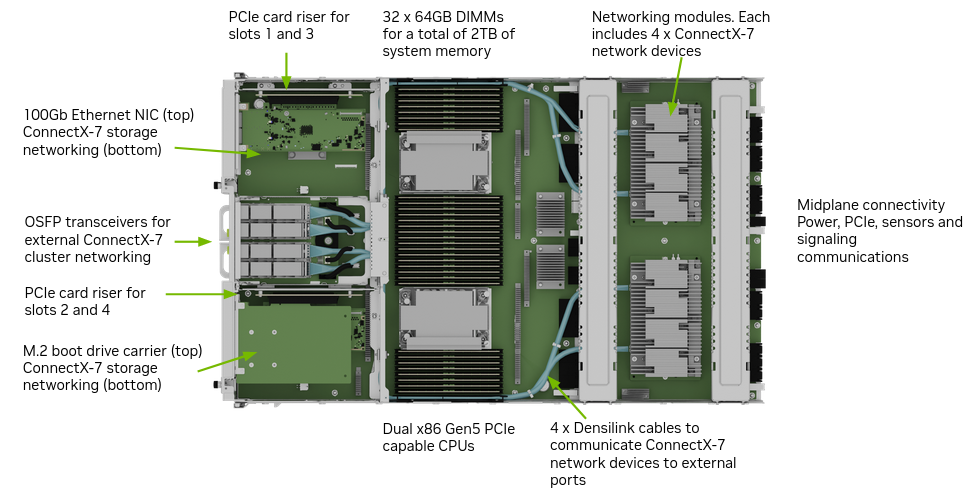
참고: NVIDIA DGX H100 Firmware Update Guide 기준
https://docs.nvidia.com/dgx/dgxh100-fw-update-guide/
DGX H100/H200 Firmware Update Guide — NVIDIA DGX H100/H200 Firmware Update Guide
docs.nvidia.com

0. 사전 준비
BMC IP / 계정 확인
- 대상 노드 workload 종료
- 패키지 파일 준비
- nvfw_DGX_250629.1.0.fwpkg
- nvfw_DGX-HGX-H100-H200x8_0014_250724.1.0.fwpkg
1. 현재 버전 확인 (사전 비교)
nvfwupd --target ip=<bmc-ip> user=<user> password=<pw> \
show_version -p nvfw_DGX_250629.1.0.fwpkg \
nvfw_DGX-HGX-H100-H200x8_0014_250724.1.0.fwpkg
✔ 현재 버전 vs 패키지 버전 비교
✔ 업데이트 필요 항목 확인
2. BMC Firmware 업데이트
nvfwupd -t ip=<bmc-ip> user=<user> password=<pw> update_fw \
-p nvfw_DGX_250629.1.0.fwpkg -y -s update_bmc.json
완료 후 BMC 재부팅:
ipmitool mc reset cold3. MB_Tray 업데이트
nvfwupd -t ip=<bmc-ip> user=<user> password=<pw> update_fw \
-p nvfw_DGX_250629.1.0.fwpkg -y -s mb_tray.json
4. GPU_Tray 업데이트
nvfwupd -t ip=<bmc-ip> user=<user> password=<pw> update_fw \
-p nvfw_DGX-HGX-H100-H200x8_0014_250724.1.0.fwpkg -y -s gpu_tray.json
5. Background Copy 상태 확인
curl -s -k -u <bmc-user>:<bmc-password> \
-H content-type:application/json \
-X GET https://<bmc-ip>/redfish/v1/Chassis/HGX_ERoT_BMC_0 | jq
출력 확인:
"BackgroundCopyStatus": "Completed"✔ Completed 확인 후 다음 단계 진행
6. 시스템 Cold Reset
ipmitool chassis power cycle7. 업데이트 후 버전 재확인
nvfwupd --target ip=<bmc-ip> user=<user> password=<pw> \
show_version -p nvfw_DGX_250629.1.0.fwpkg \
nvfw_DGX-HGX-H100-H200x8_0014_250724.1.0.fwpkg
✔ 업데이트 정상 반영 확인
8. BMC Background Copy Commit (Redfish)
HostBMC Commit
curl -k -u <bmc-user>:<pw> \
--request POST \
https://<bmc-ip>/redfish/v1/UpdateService/Actions/Oem/NvidiaUpdateService.CommitImage \
--header 'Content-Type: application/json' \
--data '{
"Targets": ["/redfish/v1/UpdateService/FirmwareInventory/HostBMC_0"]
}'
진행률 확인:
nvfwupd -t ip=<bmc-ip> user=<user> password=<pw> show_update_progress -i 1✔ 100% 확인
9. BIOS Commit
curl -k -u <bmc-user>:<pw> \
--request POST \
https://<bmc-ip>/redfish/v1/UpdateService/Actions/Oem/NvidiaUpdateService.CommitImage \
--header 'Content-Type: application/json' \
--data '{
"Targets": ["/redfish/v1/UpdateService/FirmwareInventory/HostBIOS_0"]
}'
진행률 확인:
nvfwupd -t ip=<bmc-ip> user=<user> password=<pw> show_update_progress -i 2✔ 100% 확인
10. 최종 Cold Reboot
가이드 기준:
Power cable 분리 후 5분 대기 → 재연결
완전 전원 차단 필요.
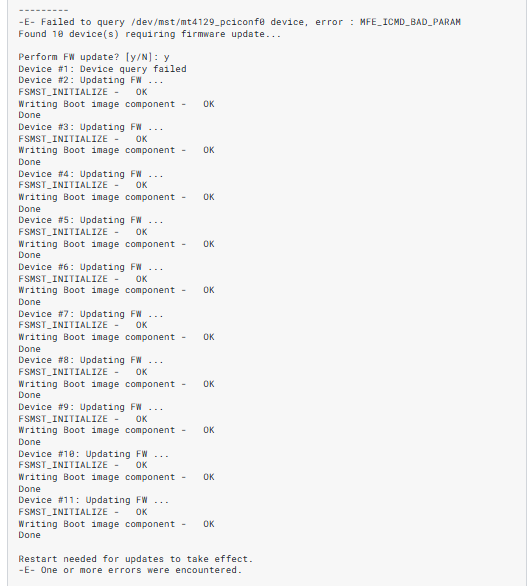
모두OK로 뜨면 끝!
작업 흐름 요약
- show_version 비교
- BMC update
- MB_Tray update
- GPU_Tray update
- BackgroundCopyStatus 확인
- Power Cycle
- Commit (BMC / BIOS)
- Cold Reboot
- 버전 재확인
주의 사항
- 중간 단계에서 전원 차단 금지
- Commit 전에 상태 반드시 확인
- 패키지 버전 호환성 체크
- 클러스터 환경에서는 drain 후 작업
반응형
LIST
'🔧 Engineering > 📁 GPU & Hardware' 카테고리의 다른 글
| 트랜시버 (0) | 2026.03.04 |
|---|---|
| Jetson AGX Thor r38.4.0 Flash + JetPack + CUDA Setup 정리 (0) | 2026.03.04 |
| BMC란 무엇인가 (0) | 2026.03.03 |
| ECC 에러란 무엇인가? (0) | 2026.03.03 |
| NVIDIA XID 에러 정리 (0) | 2026.03.03 |